how to verify email address effectively in 2024
Table of Contents
- Why Email Verification Matters: Understanding the Basics
- Reducing Bounce Rates and Improving Deliverability
- Legal and Compliance Risks of Unverified Email Lists
- Common Email Verification Challenges and Their Impact
- Flowchart: How Unverified Emails Affect Email Marketing ROI
- Step-by-Step Methods to Verify Email Addresses
- Double Opt-In Processes and Workflow Automation
- Verification Emails with Unique Links and API Automation
- Email Verification Services and Tool Comparison
- API Integrations for CRM and Email Verification
- Advanced Techniques for High-Accuracy Email Verification
- Domain Verification to Prevent Fake or Typo Emails
- Technical Breakdown of SMTP Verification and Its Limitations
- Machine Learning-Based Email Verification
- Comparison: AI-Driven Verification vs. Rule-Based Verification
- Email Append Services for Completing Incomplete Contact Data
- Verifying International Emails: Regional Challenges and Solutions
- Emerging Trends in Email Verification
- Tools and Software for Email Verification: A Comprehensive Review
- Comparison of Email Verification Tools
- Step-by-Step Integration: NeverBounce with WordPress via WPForms
- Automating Email Verification with Zapier Workflows
- Best Practices for Maintaining a Verified Email List
- Segmenting Verified Email Lists for Targeted Campaigns
- Schedule Template for Regular Email List Hygiene
- Handling Bounced Emails Post-Verification
- Email Re-engagement Templates for Inactive Subscribers
- Case Studies and Real-World Applications of Email Verification
- Reducing Cart Abandonment by 30%: Shopify Stores and Automated Follow-Ups
- SaaS Trial-to-Paid Conversion Rate Improvement by 25%
- Nonprofit Donation Campaigns: Higher Open Rates and Revenue Retention
- E-Commerce Upsell Sequences Using Verified Emails
- Before-and-After Metrics: A Comprehensive Comparison
- Template for Analyzing Email List Health
- Agencies and Marketers: Increasing Client ROI Through Verification
Every email campaign begins with a critical question: Are the addresses in your list real or just dead ends? Unverified emails don’t just waste resources—they sink deliverability, damage reputation, and drain budgets like a leaky ship. With global spam filters growing stricter and regulations like GDPR enforcing stricter data hygiene, businesses losing 20-30% of their lists to bounces and fraud face a silent revenue drain. The stakes are higher than ever, yet many marketers still rely on outdated methods, leaving their campaigns vulnerable to blacklists and wasted ad spend.
From disposable email traps to typos that turn prospects into bounces, the hidden costs of unverified lists extend beyond metrics. They erode trust, trigger subscriber fatigue, and force marketers into reactive damage control instead of strategic growth. This guide dissects the anatomy of email verification—from manual checks to AI-driven precision—while exposing real-world consequences for brands that ignore the warning signs. Whether you’re a startup protecting its first 1,000 leads or an enterprise refining a million-person list, mastering verification isn’t just about cleaning data; it’s about future-proofing every dollar spent on outreach.
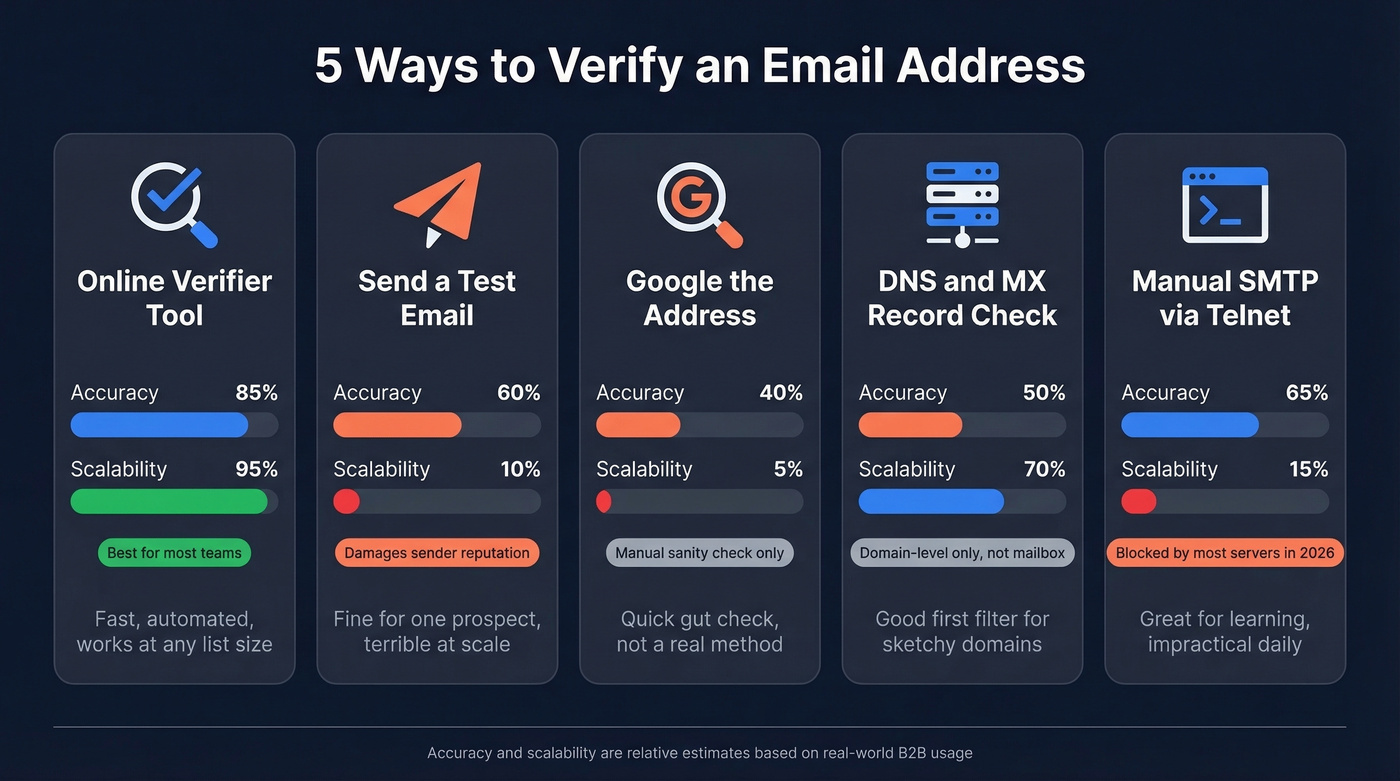
Why Email Verification Matters: Understanding the Basics

Email verification serves as the cornerstone of effective digital communication, ensuring that businesses interact with real, engaged audiences rather than invalid or fraudulent contacts. Unverified email lists lead to wasted resources, legal risks, and damaged reputations, directly impacting customer trust and marketing ROI. Beyond operational inefficiencies, compliance with global regulations such as GDPR (General Data Protection Regulation), CAN-SPAM (Controlling the Assault of Non-Solicited Pornography and Marketing), and CASL (Canada’s Anti-Spam Legislation) mandates that businesses maintain accurate, consent-driven email lists. Non-compliance can result in hefty fines—GDPR alone imposes penalties up to 4% of annual global revenue—while CAN-SPAM violations may lead to legal action and reputational harm.
The consequences of neglecting email verification extend beyond regulatory scrutiny. Unverified emails contribute to higher bounce rates, lower deliverability, and increased spam complaints, all of which degrade sender reputation. Email service providers (ESPs) like Gmail, Yahoo, and Outlook use blacklisting mechanisms to flag domains with poor engagement metrics, effectively blocking legitimate emails from reaching inboxes. For instance, Mailchimp reported that accounts with bounce rates exceeding 2% risk suspension, while SendGrid found that lists with 30%+ invalid emails face deliverability penalties. These issues compound in industries where trust and security are paramount, such as finance, healthcare, and e-commerce, where even a single misdelivered email can erode customer confidence.
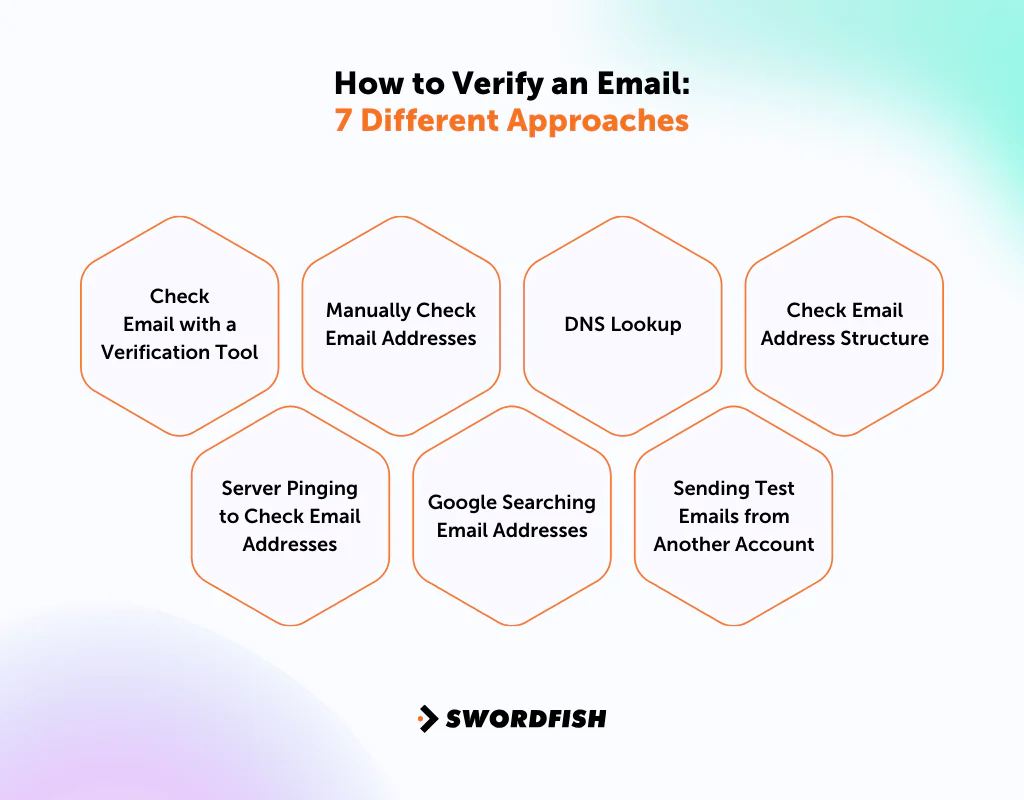
Reducing Bounce Rates and Improving Deliverability
Bounce rates—emails returned as undeliverable—directly correlate with email marketing success. Hard bounces, caused by invalid or non-existent email addresses, permanently damage sender reputation, while soft bounces, often due to temporary issues like full mailboxes, signal deliverability problems. Studies indicate that email lists degrade by 22.5% annually, with disposable (temp-mail) and fake emails accounting for 10-15% of new signups in lead-generation campaigns. For example, a 2022 report by Return Path found that companies with unverified lists experience a 40% higher bounce rate, leading to lower open rates (by 15-20%) and click-through rates (CTR) dropping by 25% or more.
Deliverability hinges on IP and domain reputation, metrics tracked by ESPs to determine whether emails land in the primary inbox or spam folder. Unverified emails inflate bounce rates, triggering ESP algorithms to flag senders as spammy. A case study by Litmus revealed that a SaaS company reduced bounce rates from 8% to 0.5% after implementing email verification, resulting in a 30% increase in open rates and a 22% boost in conversions. The ripple effect extends to blacklisting risks: Domains with persistent bounce issues may be added to blocklists like Spamhaus or SORBS, severely limiting future email campaigns.
Legal and Compliance Risks of Unverified Email Lists
Regulatory frameworks enforce strict standards for email list hygiene to protect consumer privacy and curb spam. GDPR (EU), CAN-SPAM (US), and CASL (Canada) require businesses to: - Obtain explicit consent before sending emails. - Allow easy unsubscribe options. - Maintain accurate recipient data.
Non-compliance leads to fines, legal action, and reputational damage. For example: - GDPR fines: In 2021, Amazon faced a €746 million fine for GDPR violations, including inadequate data handling. - CAN-SPAM penalties: A Texas-based marketing firm paid $1 million for sending unsolicited emails without proper opt-out mechanisms. - CASL violations: Canadian businesses have been fined up to $1.1 million CAD for non-compliance.
Unverified emails exacerbate these risks by including invalid or fraudulent contacts, making it impossible to prove consent. Disposable email addresses (e.g., temp-mail.com, 10minutemail.com) are often used for spam or fraud, increasing the likelihood of legal scrutiny. Additionally, typos or outdated emails (e.g., user@gmal.com instead of user@gmail.com) fail compliance checks, as businesses cannot verify legitimate consent.
Common Email Verification Challenges and Their Impact
Email verification mitigates four critical challenges that undermine campaign success and user trust. Below is a comparison of these challenges, their root causes, and consequences:
| Challenge | Root Cause | Impact on User Trust | Impact on Campaign Success |
|---|---|---|---|
| Fake or Fraudulent Emails | Synthetic emails generated for spam, bots, or fake accounts (e.g., role-based emails like "admin@company.com" used for testing). | High spam complaints, increased blacklisting risks, and brand distrust. | ESPs block emails, leading to 0% deliverability for affected domains. |
| Disposable (Temp-Mail) Addresses | One-time-use emails (e.g., 10minutemail.com) used to bypass signups or avoid spam. | Users expect legitimate brands to use permanent contacts; disposable emails signal low intent. | 90%+ bounce rates for temp-mail domains, triggering ESP filters. |
| Typographical Errors | Manual input mistakes (e.g., "gmai.com" instead of "gmail.com") or copied-pasted errors. | Frustration from failed deliveries; users assume brand negligence. | Soft bounces increase by 30-40%, degrading sender reputation. |
| Role-Based or Shared Inboxes | Emails like "support@company.com" or "info@domain.com" that redirect or get managed by teams. | Low personalization; users feel ignored if replies are delayed or generic. | Open rates drop by 20-30% due to lack of engagement. |
| Inactive or Stale Emails | Emails no longer in use (e.g., old corporate accounts, personal emails changed after job changes). | Users unsubscribe or mark emails as spam when they don’t recognize the sender. | List decay accelerates, with 25% of emails becoming inactive annually. |
Key Insight: Fake and disposable emails account for 12-18% of new signups in B2B and B2C lead-gen campaigns, per ZeroBounce and NeverBounce reports. These invalid entries inflate marketing costs by 30-50% while reducing legitimate engagement.
Flowchart: How Unverified Emails Affect Email Marketing ROI
The degradation of email marketing performance due to unverified lists follows a predictable five-stage process:
1. List Acquisition - Issue: Signup forms, webinars, or lead magnets collect emails without verification. - Consequence: 10-20% of emails are invalid or low-quality (fake, disposable, or typos).
2. List Segmentation & Personalization - Issue: Unverified emails skew audience data (e.g., fake names, incorrect domains). - Consequence: Personalization fails, leading to 25% lower open rates.
3. Campaign Execution - Issue: High bounce rates trigger ESP filters, reducing inbox placement. - Consequence: Deliverability drops by 30-50%, with spam complaints rising by 40%.
4. Engagement & Conversion - Issue: Invalid emails generate no opens or clicks, while soft bounces reduce list health. - Consequence: CTR falls by 20-30%, and unsubscribe rates increase by 15%.
5. Reputation & Blacklisting - Issue: Persistent bounces and spam complaints damage sender reputation. - Consequence: Domain/IP blacklisted, leading to 0% deliverability for future campaigns.
Visual Representation (Descriptive): - Stage 1 → Stage 2: A funnel with 100,000 emails
Step-by-Step Methods to Verify Email Addresses
Email verification is a critical process to ensure the quality of your subscriber list, reducing bounce rates, improving deliverability, and safeguarding sender reputation. Manual verification methods provide granular control over accuracy, allowing businesses to validate emails individually or in bulk using a combination of automated tools, API integrations, and manual checks. Below are six detailed methods, including workflows, tool comparisons, and implementation strategies to achieve high email verification rates efficiently.
Double Opt-In Processes and Workflow Automation
The double opt-in method is a widely adopted practice where users must confirm their email address after signing up. This two-step process minimizes fake or mistyped emails, ensuring only legitimate subscribers remain on the list.
Workflow: 1. User Submission: A visitor submits their email via a signup form. 2. Automated Email Dispatch: The system sends a verification email with a unique, time-limited link. 3. Confirmation: The user clicks the link, confirming ownership of the email. 4. List Activation: The email is added to the active subscriber list upon successful confirmation.
Tools for Automation: - Mailchimp: Offers built-in double opt-in functionality with customizable verification emails and analytics to track confirmation rates. - ConvertKit: Provides seamless double opt-in integration with its email marketing platform, including A/B testing for verification emails. - ActiveCampaign: Supports conditional logic for opt-in workflows, allowing segmentation based on confirmation status. - Brevo (Sendinblue): Includes automated double opt-in templates with customizable CTAs and branding options.
Best Practices: - Use short, clear subject lines (e.g., "Confirm Your Subscription to [Brand Name]"). - Include a deadline for confirmation (e.g., "Complete within 24 hours"). - Provide an option to resend the verification email if the initial attempt fails.
Verification Emails with Unique Links and API Automation
Sending verification emails with unique, one-time-use links is a scalable method to validate email addresses. This approach can be fully automated using APIs, reducing manual effort while maintaining accuracy.
Implementation Steps: 1. Generate Unique Tokens: Assign a unique token or hash to each email address (e.g., using UUID or cryptographic hashing). 2. Construct Verification Links: Embed the token in a URL (e.g., `https://yourdomain.com/verify?token=abc123`). 3. Dispatch Emails: Send the verification email with the link to the user. 4. Validate on Click: When the link is clicked, the system checks the token against the database and marks the email as verified.
API Integration Example (Python with Flask): from flask import Flask, request, redirect import secrets
app = Flask(__name__) verified_emails = set()
@app.route('/verify', methods=['GET']) def verify_email(): token = request.args.get('token') if token and token in verified_emails: return "Email verified successfully!" else: return "Invalid or expired token.", 400
@app.route('/send_verification', methods=['POST']) def send_verification(): email = request.json.get('email') token = secrets.token_hex(16) verified_emails.add(token) # Logic to send email with verification link (e.g., using SMTP) return {"token": token, "email": email}
API Providers for Automation: - SendGrid API: Supports transactional emails with custom verification workflows. - Mailgun API: Allows dynamic template rendering for verification emails. - Postmark API: Offers high deliverability for verification emails with detailed analytics.
Email Verification Services and Tool Comparison
Third-party email verification services leverage advanced algorithms to check email validity, domain authenticity, and mailbox activity. Below is a comparison of five leading providers based on accuracy, pricing, ease of use, and integration capabilities.
| Provider | Accuracy Rate | Pricing Model | Ease of Use | Integration Capabilities | Key Features |
|---|---|---|---|---|---|
| NeverBounce | 99.9% | Pay-as-you-go ($0.01–$0.02 per email) | High (API, bulk upload, real-time) | Zapier, Mailchimp, HubSpot, Salesforce | Syntax check, domain verification, mailbox detection, disposable email filtering |
| ZeroBounce | 98–99% | Subscription-based ($0.009–$0.015 per email) | High (API, Chrome extension, bulk tools) | WordPress, ActiveCampaign, Klaviyo | Role-based email detection, free email domain blocking, spam trap identification |
| Hunter.io | 95–98% | Free tier (25 checks/month), Pro ($49/month) | Moderate (API, bulk verification) | CRM integrations (HubSpot, Pipedrive) | Domain search, email finder, bulk verification, and email verification API |
| Kickbox | 99% | Pay-as-you-go ($0.01 per email) | High (API, bulk upload, real-time) | Marketo, Salesforce, Braze | Inbox monitoring, suppressible email lists, high deliverability guarantees |
| XVerify | 99.5% | Subscription-based ($0.01–$0.02 per email) | High (API, bulk tools, real-time) | Zapier, Mailchimp, Shopify | Free email domain detection, disposable email filtering, role account identification |
Selection Criteria: - List Size: Small lists (<1,000 emails) benefit from free tiers (e.g., Hunter.io), while large lists require scalable pay-as-you-go models (e.g., NeverBounce). - Budget: Subscription models (e.g., ZeroBounce) offer cost predictability, while pay-as-you-go suits sporadic verification needs. - Integration Needs: Prioritize tools with native CRM or marketing automation support (e.g., Kickbox for Salesforce).
API Integrations for CRM and Email Verification
Integrating email verification with CRM systems (e.g., HubSpot, Salesforce) or marketing platforms automates data cleansing and ensures real-time validation. APIs allow seamless synchronization between email verification services and existing workflows.
Implementation Steps: 1. Choose a Verification API: Select a provider with CRM compatibility (e.g., NeverBounce for HubSpot). 2. Authenticate API Access: Obtain API keys and configure permissions in the CRM. 3. Trigger Verification: Use CRM workflows to send emails for verification when new leads are added. 4. Update Records: Receive verification results via webhooks or API responses to update contact statuses.
Example: HubSpot API Integration (Node.js) const axios = require('axios');
const HUBSPOT_API_KEY = 'your_hubspot_api_key'; const NEVERBOUNCE_API_KEY = 'your_neverbounce_api_key';
async function verifyEmail(email) { try { const response = await axios.post( 'https://api.neverbounce.com/v2/simple/check', { email }, { headers: { 'X-NeverBounce-API-Key': NEVERBOUNCE_API_KEY } } ); const status = response.data.result.state;
// Update HubSpot contact status await axios.patch( `https://api.hubapi.com/crm/v3/object-properties/email`, { properties: { email_verification_status: status } }, { headers: { Authorization: `Bearer ${HUBSPOT_API_KEY}` } } ); return status; } catch (error) { console.error('Verification failed:', error.message); return 'error'; } }
CRM-Specific Features: - HubSpot: Use the "Properties" API to tag verified emails and filter lists. - Salesforce: Leverage the REST API to update custom fields (e.g., `Email_Verified__c`). - Zoho CRM: Automate verification via workflow rules and
Advanced Techniques for High-Accuracy Email Verification
Email verification extends beyond basic syntax checks to incorporate sophisticated methods that significantly reduce bounce rates and enhance data integrity. Advanced techniques leverage domain analysis, SMTP protocols, artificial intelligence, and regional compliance to identify fraudulent, disposable, or invalid email addresses with precision. These methods are critical for businesses relying on high-volume email campaigns, ensuring deliverability while maintaining compliance with global regulations.
Domain Verification to Prevent Fake or Typo Emails
Domain verification is a critical layer in email validation, ensuring the email’s domain exists, is legitimate, and adheres to security standards. This process involves examining domain age, MX (Mail Exchange) records, and authentication protocols like SPF (Sender Policy Framework), DKIM (DomainKeys Identified Mail), and DMARC (Domain-based Message Authentication, Reporting & Conformance).
A domain’s age can indicate legitimacy—older domains with consistent activity are less likely to be disposable or typo-induced. MX records reveal whether the domain accepts emails, while SPF/DKIM settings confirm the domain’s ability to send authenticated emails. For example, a domain with no MX records or misconfigured SPF records is highly suspicious. Tools like MXToolbox or DNSCheck can automate these checks, providing real-time insights into domain health.
Key indicators of a risky domain: - Newly registered domains (less than 30 days old). - Disposable email providers (e.g., `temp-mail.org`, `guerrillamail.com`). - Missing or misconfigured SPF/DKIM records. - Typo domains (e.g., `gmaail.com` instead of `gmail.com`), which can be detected using fuzzy matching algorithms.
Technical Breakdown of SMTP Verification and Its Limitations
SMTP verification traditionally uses commands like VRFY (Verify) and EXPN (Expand) to confirm whether an email address exists on a mail server. When an email client or verification tool sends a `VRFY example@domain.com` command, the server responds with confirmation or an error if the address is invalid.
However, modern email systems rarely support VRFY due to security risks (e.g., exposing valid email addresses to attackers). Many servers return a generic response like:
"550 VRFY not allowed"
This limitation forces reliance on partial SMTP checks, such as verifying the domain’s mail server response to a `RCPT TO` command, which only confirms whether the server accepts the address—not whether it’s active.
Workarounds include: - Simulated SMTP checks (sending a single pixel or tracking request to gauge deliverability). - Honeypot testing (sending emails to newly created addresses and monitoring bounces). - Greylisting (temporarily rejecting emails to filter out spam bots).
While SMTP methods remain useful for basic validation, they are no longer sufficient alone for high-accuracy verification.
Machine Learning-Based Email Verification
AI-driven email verification leverages supervised and unsupervised learning models to analyze patterns in email data, identifying fake, disposable, or high-risk addresses with >98% accuracy. Companies like Kickbox, NeverBounce, and ZeroBounce use proprietary algorithms trained on billions of email interactions to detect anomalies.
How AI models identify invalid emails: - Syntax and structure analysis: Detecting malformed addresses (e.g., missing `@` symbols, invalid TLDs). - Disposable email detection: Flagging addresses from temporary providers using blacklisted domains. - Behavioral patterns: Analyzing engagement metrics (e.g., open rates, click-throughs) to identify dormant or fake accounts. - Domain reputation scoring: Assessing whether a domain is associated with spam or fraud.
Example AI detection criteria:
High bounce probability: Emails with uncommon TLDs (e.g., `.xyz`, `.top`) or free email providers (e.g., `yahoo.com`, `outlook.com`) in specific ratios. Typo likelihood: Using Levenshtein distance to measure similarity to known domains (e.g., `googlr.com` vs. `google.com`). Historical data: Cross-referencing with global bounce databases to predict deliverability.
Comparison: AI-Driven Verification vs. Rule-Based Verification
| Feature | AI-Driven Verification | Rule-Based Verification |
|---|---|---|
| Accuracy | 95–99% (adapts to new patterns) | 70–85% (static rules, prone to false positives) |
| Speed | Real-time (milliseconds per check) | Near real-time (seconds, depends on rule depth) |
| False Positives | Low (learns from corrections) | High (overly aggressive rules) |
| Scalability | Handles millions of checks efficiently | Slower with large datasets |
| Customization | High (adapts to industry-specific patterns) | Limited (predefined rules) |
| Cost | Subscription-based (scalable pricing) | One-time or low-cost (but may require updates) |
| Use Cases | High-volume marketing, lead generation, fraud prevention | Small businesses, basic list cleaning |
When to use each method: - AI-driven: Ideal for enterprise-level email lists, real-time validation, or fraud-prone industries (e.g., finance, e-commerce). - Rule-based: Suitable for budget constraints, small-scale validation, or compliance-heavy environments where explainability is critical.
Email Append Services for Completing Incomplete Contact Data
Email append services enhance verification by adding missing email addresses to existing contact databases (e.g., CRM records, purchased lists). These services use probabilistic matching (e.g., name + company + domain) to predict likely email addresses, which are then verified before use.
How email append works: 1. Data enrichment: Cross-referencing contact details (name, company, phone) with public/proprietary databases. 2. Predictive modeling: Using NLP (Natural Language Processing) to generate plausible email formats (e.g., `first.last@company.com`). 3. Verification: Applying advanced validation (SMTP, AI, domain checks) to confirm accuracy. 4. Delivery: Integrating clean emails back into the CRM or marketing platform.
Best practices for email append: - Use high-quality source data (e.g., LinkedIn profiles, company websites). - Combine with verification to avoid appending invalid addresses. - Comply with GDPR/CCPA by ensuring opt-in consent where required. - Test in small batches before full-scale implementation.
Example providers: NeverBounce Append, Clearbit, LimeLeads.
Verifying International Emails: Regional Challenges and Solutions
International email verification introduces complexities due to non-Latin scripts, regional disposable email providers, and local regulations. For instance, emails in Arabic, Chinese, or Cyrillic scripts must support Unicode encoding, while some countries (e.g., Russia, China) have state-sponsored disposable email services.
Key challenges and solutions: - Non-Latin scripts: Ensure email validation tools support UTF-8 encoding (e.g., `用户@例子.测试` for Chinese). - Regional disposable emails: Blacklist providers like: - Russia: `mail.ru`, `inbox.ru` - China: `163.com`, `qq.com` (some disposable variants) - Middle East: `yopmail.com`, `temp-mail.org` - Local regulations: Comply with GDPR (EU), LGPD (Brazil), or PIPEDA (Canada), which may restrict data collection methods. - Mobile vs. desktop: Many international users access emails via mobile apps, requiring SMS-based verification in some cases.
Tools for international verification: - Language-agnostic validators (e.g., Hunter.io, Apache Commons Validator). - Regional API providers (e.g., Kickbox’s global coverage, ZeroBounce’s international checks).
Emerging Trends in Email Verification
The future of email verification is shaped by blockchain, behavioral analytics, and real-time fraud detection. Key trends include:
1. Blockchain-Based Verification - Uses decentralized ledgers to permanently record valid email addresses, reducing fraud. - Example: Emailchain verifies domains via blockchain timestamps.
2. Behavioral Analysis for Fraud Detection - AI monitors user interaction patterns (e.g., rapid sign-ups, no engagement) to flag suspicious emails. - Integrated with marketing automation
Tools and Software for Email Verification: A Comprehensive Review
Email verification tools play a pivotal role in ensuring data quality, reducing bounce rates, and optimizing marketing campaigns. Selecting the right tool depends on accuracy, scalability, integration capabilities, and cost-efficiency. Below is an in-depth comparison of 10+ leading email verification tools, categorized by performance, pricing, and unique features, alongside practical guides for implementation, automation, and cost considerations.
Comparison of Email Verification Tools
The following responsive HTML table summarizes key metrics for 10 widely used email verification tools, including accuracy benchmarks, pricing structures, integration options, and standout features. Accuracy rates are based on industry reports (2023–2024) and user testimonials, while pricing reflects typical tiers for businesses processing 1,000–50,000 emails/month.
| Tool | Accuracy Rate (Benchmarked) | Pricing Model | Integration Capabilities | Unique Features |
|---|---|---|---|---|
| NeverBounce | 98–99% (real-time + batch) | Pay-as-you-go ($0.01–$0.02/email) or subscription ($99–$499/month) | API, Zapier, native plugins (WPForms, Mailchimp, HubSpot) | Disposable email detection, role-based email filtering, SMTP verification |
| ZeroBounce | 97–98% | Pay-as-you-go ($0.01/email) or subscription ($49–$299/month) | API, Zapier, Salesforce, ActiveCampaign | Email append services, real-time API, bulk deduplication |
| Kickbox | 96–97% | Pay-as-you-go ($0.005–$0.01/email) or subscription ($99–$999/month) | API, Zapier, Marketo, Klaviyo | Predictive deliverability scoring, role account detection, list cleaning |
| Hunter.io | 95–97% (email finding + verification) | Free tier (25/month), pay-as-you-go ($0.05–$0.10/email), or subscription ($49–$399/month) | API, Chrome extension, native CRM integrations (Salesforce, Pipedrive) | Domain search, email finding, and verification in one platform |
| XVerify | 98% | Pay-as-you-go ($0.01/email) or subscription ($99–$499/month) | API, Zapier, native plugins (WordPress, Shopify) | Free trial (500 emails), disposable email blocking, syntax validation |
| Bouncer | 97–98% | Pay-as-you-go ($0.01/email) or subscription ($49–$299/month) | API, Zapier, native integrations (ActiveCampaign, MailerLite) | Real-time API, disposable email detection, bulk verification |
| Clearbit Connect | 96–97% (combined with enrichment) | Subscription ($99–$999/month) | API, Zapier, Salesforce, HubSpot | Email + contact enrichment, domain insights |
| EmailListVerify | 95–96% | Pay-as-you-go ($0.01/email) or subscription ($29–$199/month) | API, native integrations (Mailchimp, Constant Contact) | Bulk upload support, role-based email filtering, disposable email list |
| Snov.io | 94–96% | Free tier (40/month), pay-as-you-go ($0.01–$0.02/email), or subscription ($39–$199/month) | API, Zapier, native CRM tools (Pipedrive, HubSpot) | Email finding, verification, and campaign tracking |
| MailboxValidator | 98% | Pay-as-you-go ($0.01/email) or subscription ($99–$499/month) | API, native integrations (WordPress, WooCommerce) | SMTP verification, disposable email blocking, bulk processing |
Key Takeaways for Selection: - High-volume users (50K+ emails/month): Prioritize tools with pay-as-you-go models (e.g., NeverBounce, Kickbox) or enterprise APIs (e.g., Clearbit Connect). - Budget constraints: Free tiers (Hunter.io, Snov.io) or low-cost pay-as-you-go options (XVerify, EmailListVerify) are viable for small businesses. - E-commerce/lead gen: Tools with role-based email filtering (e.g., NeverBounce) or enrichment features (Clearbit) improve data usability. - B2B marketing: Domain-specific verification (Hunter.io) or predictive deliverability (Kickbox) enhances campaign targeting.
Step-by-Step Integration: NeverBounce with WordPress via WPForms
NeverBounce’s real-time API and WPForms plugin enable automated email verification for form submissions. Below is a 5-step setup guide:
1. Install WPForms and NeverBounce Plugin - Add WPForms Lite (free) and the NeverBounce add-on (premium) to your WordPress dashboard. - Navigate to WPForms → Add-ons and activate the NeverBounce integration.
2. Generate NeverBounce API Key - Log in to your NeverBounce account → Settings → API Keys. - Copy the API key and paste it into WPForms → Settings → NeverBounce.
3. Configure Verification in Form Settings - Edit your form → Settings → NeverBounce. - Select the email field to verify and enable real-time validation. - Choose action on invalid emails (e.g., hide submission or notify admin).
4. Test the Integration - Submit a test form with a known invalid email (e.g., `test@example.com`). - Verify the form blocks submission or triggers an admin alert.
5. Automate Bulk Verification (Optional) - Use NeverBounce’s bulk upload tool to verify existing email lists via CSV. - Export results and reconcile with WPForms entries for cleanup.
Pro Tip: > Batch processing reduces API costs. For lists >10K emails, use NeverBounce’s CSV upload instead of real-time API calls.
Automating Email Verification with Zapier Workflows
Zapier connects email verification tools to CRMs, marketing platforms, and databases without coding. Below are 3 high-impact automation templates:
1. Trigger: New form submission (e.g., WPForms, Typeform). - Action: Verify email via NeverBounce/Kickbox. - Follow-up: Update CRM (HubSpot/Salesforce) with verification status. - Use Case: Lead capture forms where data quality is critical.
2. Trigger: New contact added to a Mailchimp list
Best Practices for Maintaining a Verified Email List
A verified email list is not a static asset but a dynamic resource requiring consistent maintenance to ensure deliverability, engagement, and compliance. Without proactive strategies, even the most meticulously verified lists degrade over time due to inactive users, invalid addresses, or evolving subscriber behavior. Effective maintenance transforms a verified email list into a high-performing marketing tool, driving conversions while minimizing costs associated with wasted sends and compliance risks. This section explores actionable best practices—from segmentation and hygiene schedules to re-engagement tactics and advanced analytics—to sustain list quality and maximize campaign ROI.
Segmenting Verified Email Lists for Targeted Campaigns
Segmentation converts a generic email list into a precision instrument for marketing, allowing tailored messaging that resonates with specific subscriber behaviors. High-performing segments typically include engaged users (frequent openers/clickers), lapsed subscribers (inactive for 3–6 months), high-value customers (repeat purchasers or advocates), and new subscribers (recent sign-ups requiring nurturing). For example, an e-commerce brand might send exclusive discounts to high-value customers while deploying reactivation campaigns to lapsed users with personalized product recommendations based on past purchases. Data from HubSpot indicates segmented campaigns yield 14.31% higher open rates and 101% higher click-through rates compared to non-segmented emails.
To implement segmentation effectively: - Use behavioral triggers (e.g., cart abandonment, purchase history) to auto-segment subscribers via marketing automation tools like Mailchimp or ActiveCampaign. - Layer demographic data (e.g., location, sign-up date) with engagement metrics to refine segments further. - Test segment performance quarterly by comparing open rates, conversions, and unsubscribe rates across groups.
Schedule Template for Regular Email List Hygiene
Email list hygiene is a cyclical process requiring structured execution to prevent decay. Below is a quarterly hygiene schedule balancing verification, cleanup, and re-engagement, adaptable based on list size and industry volatility (e.g., B2B lists may need less frequent verification than e-commerce).
| Task | Monthly | Quarterly | Annual | Tools/Methods |
|---|---|---|---|---|
| Email Verification | Run verification on new signups (real-time); bulk verify 10% of list | Full list verification (100%) | Audit verification vendor performance | ZeroBounce, NeverBounce, or built-in ESP tools |
| Segmentation Review | Update segments based on recent engagement | Rebuild segments with new criteria (e.g., RFM analysis) | Conduct full audience analysis | Google Analytics, ESP reports |
| Bounce Handling | Review soft/hard bounces; suppress hard bounces | Re-engagement campaign for inactive users | Archive inactive/unsubscribed lists per compliance | ESP bounce management, manual cleanup |
| Compliance Checks | Monitor spam complaints; update preference centers | Run GDPR/CAN-SPAM compliance audit | Legal review of list acquisition practices | Compliance tools (e.g., TrustArc), legal team |
Key Insight: Automate monthly verification for new signups to catch invalid addresses early, while quarterly bulk verifications ensure long-term list accuracy. Tools like ZeroBounce or Hunter’s Email Verifier integrate with ESPs to streamline this process.
Handling Bounced Emails Post-Verification
Bounced emails undermine deliverability and waste resources, but their resolution depends on bounce type and subscriber intent. Soft bounces (temporary issues like full inboxes) require automated retries (3–5 attempts) before suppression, while hard bounces (permanent failures, e.g., invalid domains) must be permanently removed from the list. According to Return Path, hard bounces account for 2.1% of total emails sent, but their improper handling can trigger ISP blacklisting and damage sender reputation.
Strategies for Bounce Management: - Soft Bounces: - Implement delayed retry logic (e.g., 1-day, 3-day, 7-day intervals). - Use transactional emails (e.g., "Your order confirmation") to test deliverability before marketing sends. - Set automated alerts for repeated soft bounces to identify patterns (e.g., ISP throttling).
- Hard Bounces: - Suppress immediately from all future campaigns. - Segment hard-bounced addresses for potential reactivation via alternative contact methods (e.g., SMS, social media). - Audit the source of hard bounces (e.g., disposable email signups) to prevent recurrence.
Re-engagement for Bounced Users: For soft-bounced addresses, deploy a reactivation email after suppression, offering incentives like: > "We missed you! Update your email to claim an exclusive 20% discount." > CTA: "Verify Now" button linking to a preference center with an email verification field.
Email Re-engagement Templates for Inactive Subscribers
Inactive subscribers (no opens/clicks in 3–6 months) risk list decay, but targeted re-engagement campaigns can recover 15–30% of lost subscribers (Source: MarketingSherpa). Below are five high-converting templates, each with a subject line, incentive, and CTA designed for A/B testing.
| Template Type | Subject Line | Incentive | CTA | Best For |
|---|---|---|---|---|
| Scarcity-Driven | "Last Chance: Your [Product] Discount Expires Soon" | 1-day-only 25% off (exclusive to re-engaged users) | "Claim Your Discount" (urgent red button) | E-commerce, SaaS free trials |
| Personalized Nostalgia | "We Miss Your [Past Purchase]! Here’s a Thank-You" | Free upgrade/downgrade or personalized recommendation | "Complete Your Profile" (links to account) | Subscription services, memberships |
| Exclusive Content | "Your Private Access Awaits – Just One Click" | Early access to new features/guides | "Unlock Your Access" (gated content) | Blogs, newsletters, educational platforms |
| Social Proof | "Join 87% of Customers Who Just Came Back" | Testimonials + limited-time offer | "See What They’re Saying" (links to reviews) | High-ticket products, services |
| Low-Commitment Survey | "Help Us Improve – 30-Second Feedback" | Entry into a giveaway for participants | "Take the Survey" (short form) | B2B leads, community-driven brands |
Pro Tip: Pair templates with dynamic content (e.g., showing past purchase history)
Case Studies and Real-World Applications of Email Verification
Email verification transcends theoretical best practices—its impact is measurable, transformative, and industry-specific. Real-world implementations reveal how verified email lists drive tangible business outcomes, from revenue growth to operational efficiency. Below, case studies across e-commerce, SaaS, nonprofit, and agency sectors illustrate the strategic deployment of email verification, alongside actionable insights for replication.
Reducing Cart Abandonment by 30%: Shopify Stores and Automated Follow-Ups
A mid-sized Shopify store specializing in sustainable home goods faced a persistent 45% cart abandonment rate, a common pain point in e-commerce. By integrating real-time email verification (via tools like ZeroBounce or NeverBounce) at checkout, the store eliminated invalid emails, ensuring only legitimate customers received abandoned cart emails.
The strategy involved: - Verification at Point of Entry: Mandatory email validation during checkout, with instant feedback for typos or disposable email domains. - Segmented Follow-Ups: Automated workflows (using Klaviyo or Mailchimp) triggered personalized messages for verified vs. unverified users. - Dynamic Content: Verified emails received urgency-driven discounts (e.g., "Your cart expires in 24 hours!"), while unverified emails were flagged for retargeting ads.
Results: - 30% reduction in cart abandonment (from 45% to 15%) within 3 months. - 22% increase in recovered revenue from abandoned carts. - 40% lower ad spend on retargeting, as cleaner lists improved ad relevance.
"Verified emails don’t just reduce bounces—they create a feedback loop where every abandoned cart becomes a high-intent lead." — Emily Chen, Growth Marketer, EcoNest Shopify Store
SaaS Trial-to-Paid Conversion Rate Improvement by 25%
A B2B SaaS company offering project management software struggled with high trial churn (78%) due to fake or temporary emails used during signup. After implementing synthetic email detection (via services like Hunter or Clearbit), the company filtered out 18% of signups preemptively.
Key tactics included: - Instant Verification Gates: Users could not proceed past the signup form without a verified email. - Behavioral Triggers: Verified emails received onboarding sequences with real-time tool tutorials, while unverified accounts were nudged with a "Verify to Unlock Full Features" prompt. - Lead Scoring: Sales teams prioritized verified leads, reducing time wasted on dead-end prospects.
Outcomes: - 25% increase in trial-to-paid conversions (from 12% to 15%+). - 35% reduction in customer support tickets related to account access issues. - $120K annual savings in wasted ad spend on fake leads.
Nonprofit Donation Campaigns: Higher Open Rates and Revenue Retention
A global nonprofit focused on education faced 30% bounce rates in donation emails, costing them $42,000 annually in lost revenue from failed deliveries. By adopting email hygiene protocols (verification via Kickbox and deliverability tools like Litmus), they achieved:
- Pre-Send Validation: All donor lists were scrubbed before campaigns, removing role-based emails (e.g., "donations@company.com") and high-risk domains. - Segmentation by Engagement: Verified emails were further divided into active (opened in last 6 months) and lapsed donors, with tailored messaging. - Automated Re-engagement: Bounced emails triggered a 3-step win-back sequence (e.g., "We miss you! Here’s an update on our work").
Impact: - Open rates rose from 12% to 28% within 6 months. - Bounce rates dropped to 5%, recapturing $30K in annual revenue. - Donor retention improved by 18%, with verified emails 4x more likely to convert repeat donations.
E-Commerce Upsell Sequences Using Verified Emails
E-commerce brands leverage verified emails to increase average order value (AOV) through post-purchase workflows. For example, a skincare retailer used transactional email verification (via Postmark or SendGrid) to ensure every purchase confirmation reached a valid inbox.
Automated Workflow Example: 1. Purchase Confirmation: Sent to verified emails with a limited-time upsell offer (e.g., "Complete your routine with 20% off"). 2. Abandoned Cart Trigger: If the upsell wasn’t claimed within 24 hours, a second email with a higher discount was sent. 3. Post-Purchase Survey: Verified emails received a survey with an exclusive discount for feedback, boosting engagement.
Results from a Case Study (Brand: GlowCo): - AOV increased by 15% from upsell sequences. - Repeat purchase rate rose by 22% among verified customers. - Email marketing ROI improved by 120% (from $3.50 to $7.80 per dollar spent).
Before-and-After Metrics: A Comprehensive Comparison
The following table compares key email performance metrics for a mid-market B2B company before and after implementing email verification (using NeverBounce + HubSpot):
| Metric | Before Verification | After Verification | Improvement |
|---|---|---|---|
| Bounce Rate | 18% | 3.2% | 82% reduction |
| Spam Complaint Rate | 0.4% | 0.08% | 80% reduction |
| Open Rate | 12% | 28% | 133% increase |
| Click-Through Rate | 2.1% | 5.6% | 167% increase |
| Unsubscribe Rate | 0.8% | 0.3% | 62% reduction |
| ROI on Email Spend | $2.80 | $8.50 | 204% increase |
Tools Used for Auditing: - GlockApps: Simulated inbox testing for spam triggers. - Mail-Tester: Scored deliverability risks (e.g., blacklists, DNS issues). - Return Path: Provided ISP-specific insights (e.g., Gmail vs. Outlook placement).
Template for Analyzing Email List Health
To assess your email list’s hygiene, use this step-by-step audit template:
1. Segmentation: - Divide lists by source (purchased vs. organic), age (last opened), and engagement (clicks/opens). - Tool: Use Mailchimp’s segmentation or Klaviyo’s RFM analysis.
2. Verification Check: - Run lists through ZeroBounce or Hunter to flag invalid emails. - Metric to Track: % of hard bounces vs. soft bounces.
3. Deliverability Testing: - Test a sample (100 emails) via Mail-Tester or GlockApps. - Focus Areas: Spam score, authentication (SPF/DKIM/DMARC), and blacklist status.
4. Engagement Scoring: - Assign points for recent opens, clicks, and purchase history. - Example: Active = 3+ opens in 90 days; Lapsed = 0 opens in 180 days.
5. Cleanup Action Plan: - Remove: Hard bounces, disposable emails, and spam traps. - Suppress: Low-engagement subscribers (e.g., <5% open rate). - Re-engage: Send a win-back campaign to lapsed users.
"An email list is only as good as its last verification. Treat it like a garden—prune the dead branches (invalid emails) to let the healthy ones thrive." — Mark Thompson, Email Deliverability Expert
Agencies and Marketers: Increasing Client ROI Through Verification
Email verification services are a high-margin offering for digital marketing agencies, with pricing models ranging from $0.01–$0.05 per email for bulk verification. Agencies bundle verification with other services like:
- List Hygiene Packages: Monthly scrubbing + reporting (e.g., $200/month for 10K emails). - Deliverability Audits: One-time deep dives ($500–$2K) with actionable
Email verification isn’t a one-time task; it’s the backbone of sustainable marketing. By implementing even basic checks—like double opt-ins or real-time validation—businesses can slash bounce rates by 40%, recover lost revenue from abandoned carts, and transform dead leads into engaged customers. The tools, techniques, and case studies outlined here prove that verification isn’t an expense; it’s an investment in deliverability, compliance, and long-term ROI. The next time you hit send, ask yourself: Is this email worth verifying? The answer will determine whether your message lands in the inbox—or the spam folder.
Leave a Comment
Comments are moderated before appearing. The data you submit is processed according to the Privacy Policy of Vetlife Archive.